
The iPad has quietly evolved from a media device into something far more flexible. In the right hands, it becomes a sketchbook, a studio, a classroom, a notebook, and a workstation all at once. What makes this transformation possible is not the hardware alone, but the apps designed to take full advantage of it.
The best iPad apps don’t simply shrink desktop software or stretch phone interfaces. They rethink how people work, create, and think when touch, pencil, keyboard, and portability merge.
Creativity without friction
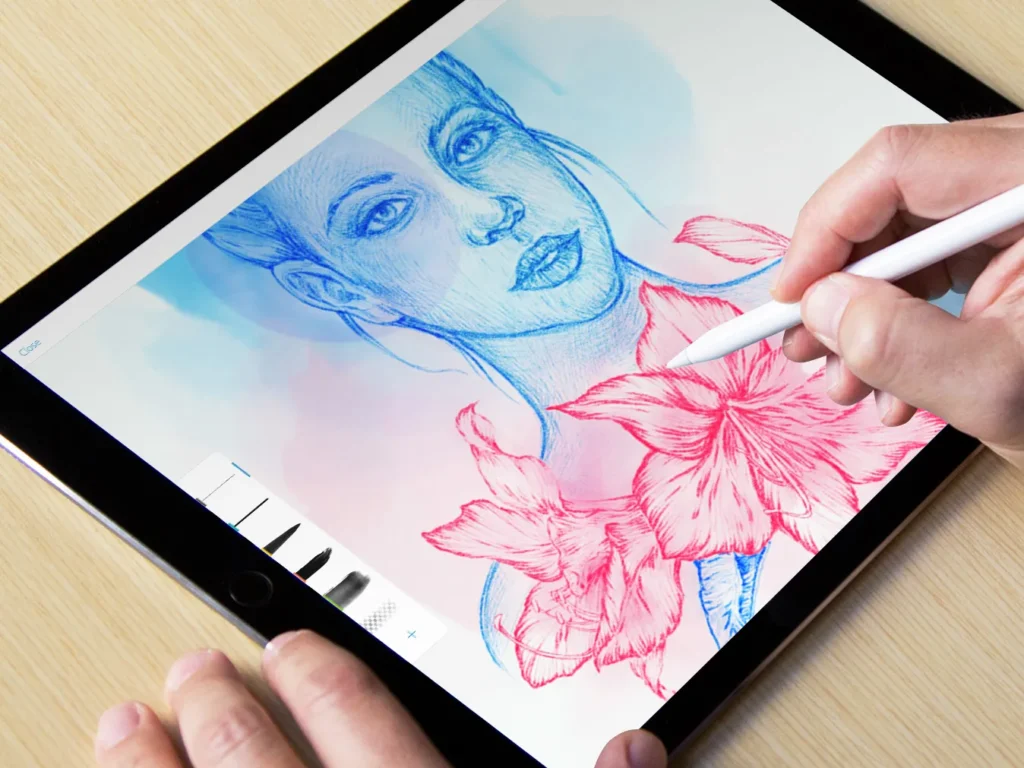
For artists, designers, and visual thinkers, the iPad has become an essential creative surface.
Apps built specifically for the Apple Pencil allow ideas to move directly from mind to screen without technical interruption. Drawing feels physical. Editing feels intuitive. Layers, brushes, and tools respond naturally rather than mechanically.
The result is creative flow. The technology disappears, leaving only the act of making.
Productivity that adapts to you
The most effective productivity apps on iPad embrace flexibility instead of rigidity.
They allow handwritten notes alongside typed text. They support drag-and-drop between apps. They work seamlessly in Split View and Slide Over, turning the iPad into a dynamic workspace rather than a single-task device.
Planning, writing, annotating, and organizing happen in one place, without constant context switching. This is especially powerful for people who think visually or work across multiple disciplines.
Learning reimagined
Educational apps on iPad have transformed how people learn at every age.
Interactive textbooks, language platforms, music instruction, and science tools use touch and motion to deepen understanding. Learning becomes active rather than passive.
Instead of scrolling endlessly, users engage. They experiment, annotate, replay, and explore concepts at their own pace. The iPad becomes not just a screen, but a learning environment.
Photo, video, and storytelling tools
The iPad is increasingly used for professional-level photo and video work, especially for creators who value mobility.
Editing apps optimized for touch allow precise adjustments without the intimidation of complex desktop interfaces. Video timelines become tactile. Color grading feels immediate. Storytelling becomes faster and more intuitive.
For journalists, filmmakers, and content creators, this portability changes when and where work can happen.
Focus in a distracted world
Some of the best iPad apps do less, not more.
Distraction-free writing apps, meditation platforms, reading tools, and minimalist task managers help users slow down and focus. They respect attention instead of competing for it.
In a world of constant alerts and noise, apps that protect mental space feel increasingly valuable.
Why iPad apps stand apart
What separates the best iPad apps from average ones is intention.
They are designed for touch-first interaction. They understand gesture, pressure, and spatial awareness. They embrace the iPad not as a compromise device, but as its own category.
When apps honor this philosophy, the iPad stops feeling like a tablet and starts feeling like a personal tool.
The ecosystem advantage
Part of what makes iPad apps so effective is how seamlessly they integrate with the broader ecosystem built by Apple.
Files sync across devices. Work moves from iPad to Mac to iPhone effortlessly. Creativity doesn’t stay trapped in one place.
This continuity allows apps to become part of daily life rather than isolated tools.
Choosing the best apps for you
The best iPad apps are not universal. They depend on how you think, work, and create.
Some people turn their iPad into a digital notebook. Others into an art studio. Others into a mobile office or learning hub.
The strength of the platform lies in its adaptability.
With the right apps, the iPad becomes less about consumption and more about expression, productivity, and control.
And that is where it truly shines.